

TL;DR (Executive Summary)
Accurate data center capacity planning starts with a clear view of nameplate capacities and the current load on each infrastructure component. Track and trend rack space and cooling infrastructure, then compare those values with live telemetry to plan for future demand and expansion. Scenario planning lets operators test changes, reserve capacity, and validate redundancy before equipment arrives. Real-time data also helps teams plan AI and high-density deployments against live power and cooling headroom.
How to know where capacity exists before you deploy
Teams cannot determine available capacity from one resource alone. Constraints in the supporting power, space, cooling, weight, or network infrastructure can still limit what teams can deploy.
Modius® OpenData® Planning evaluates resources against current infrastructure data to show where teams can deploy equipment. Infrastructure managers can see available headroom, identify the data center resources limiting capacity, and model changes before ordering equipment.
See capacity across power, space, cooling, and weight
Facilities teams track UPS load, while IT teams manage rack layouts and asset placement. Effective data center capacity management brings those constraints together to show how much capacity is available today. A good capacity planning strategy also accounts for workload demands and future growth.
OpenData Planning shows available capacity by site, room, row, and rack across:
- Power — measured load and remaining headroom at the rack PDU, PDU/RPP, UPS, and upstream feed
- Space — usable rack units, not just empty ones
- Cooling — available cooling capacity based on actual heat load
- Weight — rack and floor loading limits
- Network — available ports, paths, and bandwidth needs
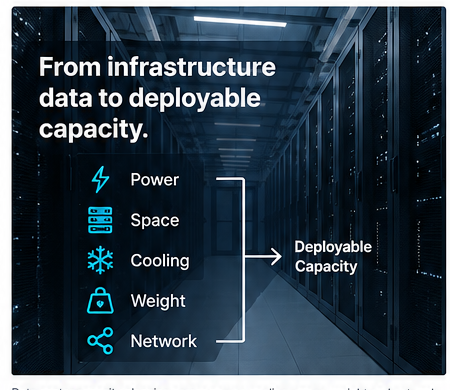
Five resources determine deployable capacity: power, space, cooling, weight, and network. Data center capacity planning software reviews them together, reflecting the facility as it operates now, not how it looked at the last audit.
Know what can actually be deployed
Deployable capacity is the smallest headroom across every upstream resource a deployment needs. A rack may show 12 available rack units, but rack capacity depends on more than space — if the branch circuit has no remaining power, that rack cannot support the deployment. The OpenData Planning Module identifies the limiting resource at the rack, row, and room level, so teams can base capacity decisions on real conditions.
Find stranded capacity you already paid for
Stranded capacity looks available, but constraints on other resources prevent teams from using it. Common causes include:
- Imbalance in resource capacity — for example, stranded rack U-space because power has reached its designed capacity.
- Leaving redundancy out of usable-capacity calculations.
- Not clearing reservations that no longer apply.
OpenData combines power, space, and cooling resource blocks with dashboards and reports to surface stranded capacity.
Model changes before touching infrastructure
OpenData Planning tests equipment adds, moves, and decommissions against current operational data. A plan can check:
- Rack space and weight
- Rack power and circuit loading
- PDU, UPS, and feed capacity
- Cooling impact
- Network ports and paths
- Redundancy after the change
Remove a server from a plan, and OpenData updates the expected power load across the upstream power chain.
Compare planning options side by side
Teams can build and compare several plans at once — testing different rooms for a deployment, or keeping a failover plan ready for future use. These comparisons support long term planning for data center operations. Each plan moves through draft, review, approval, and execution, creating a clear decision record.
How to understand upstream power limits
Rack-level planning alone does not give a complete view. A deployment may fit a cabinet but still exceed the branch circuit, PDU, UPS, or upstream feed. OpenData models the full power chain to the utility source, and teams can enter estimates where direct telemetry is missing.
How to reserve capacity and avoid double booking
Available, reserved, and consumed capacity are different numbers, and OpenData Planning records each separately. Once teams approve a project, the system subtracts its reserved capacity from available headroom before the hardware arrives.
How to validate redundancy before approval
Usable capacity must account for required resilience. OpenData checks planned changes against N, N+1, and 2N requirements, so teams can review the post-failure state before approval.
Capacity planning for AI and high-density infrastructure
AI and GPU deployments strain traditional planning models in data centers. Power density can rise faster than a facility uses floor space, and dense hardware can hit rack and floor weight limits sooner than expected. Cooling may become the main constraint, and liquid cooling adds new planning needs.
Static spreadsheets struggle to keep pace. Real-time data and scenario planning give operators a current view. Storage capacity and network bandwidth must also match workload demands, alongside power and cooling limits.
Example: can we install twelve 10 kW GPU servers?
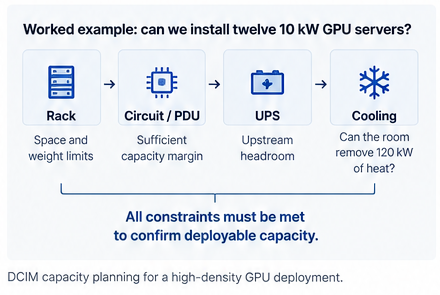
A request arrives for twelve GPU servers at 10 kW each — 120 kW total. The floor plan shows enough space, but that does not mean the deployment will work. Before approval, the team should check:
- Rack space: servers fit the target racks.
- Rack weight: rack and floor loading stay within limits.
- Rack power: the rack can support the added load.
- Branch circuit: sufficient margin.
- PDU/RPP: available upstream headroom.
- UPS: support for the load at the required redundancy level.
- Cooling: the room can remove the added 120 kW of heat.
- Network: enough ports and paths are available.
- Redundancy: the facility can still handle a failure after deployment.
Spreadsheets vs. DCIM capacity planning
Spreadsheets can work in simple environments, but they rely on manual updates and periodic audits. Data center infrastructure management (DCIM) software connects planning with current operating data. Teams can use predictive analytics to forecast future demand and confirm the infrastructure can support it. The difference is simple: spreadsheets describe what should be available; DCIM capacity planning shows what is available now. Capacity planning can also inform energy efficiency decisions by helping teams consolidate and identify unused equipment.
Related resources
Learn more about Modius OpenData, Power Management, and Asset Management. For background, see What Is DCIM? and How Colocation Providers Find and Reclaim Stranded Power Capacity.
Frequently Asked Questions
What is DCIM capacity planning software?
It shows how much capacity a data center has across power, space, cooling, weight, and network resources. It also tests planned changes against those limits, so teams see what they can actually deploy.
Should capacity planning use real-time data?
Yes. Current measured data is more accurate than nameplate ratings or periodic audits alone. The OpenData Planning Module checks planned changes against measured data, so teams plan against actual load.
How does capacity planning reduce stranded capacity?
It identifies what limits usable capacity at each rack, row, or room. Teams can then rebalance load, clear old reservations, or remove unused equipment.
Can multiple plans run at the same time?
Yes. Teams can evaluate multiple plans or scenarios separately, each with its own approval process, without changing the live environment.
Do we need full device monitoring before we can plan capacity?
No. Teams can start with the data they already have and use estimates where measurements are missing. Accuracy improves as monitoring expands.