
By Matt Charavell
TL;DR: Why AI Data Centers Need Source-to-Rack Visibility:
- Rack-level monitoring isn't enough. AI data center operators need source-to-rack visibility to identify upstream power limits, understand equipment dependencies, and assess available capacity.
Operators must manage power and cooling together. Next-generation DCIM, like Modius® OpenData®, connects power, cooling, and IT data. This helps operators find unused capacity, reduce downtime risk, and plan future AI deployments.
AI data centers need a connected view of power, cooling, and IT demand. Rack power readings alone cannot show whether upstream equipment and cooling systems can safely support another deployment.
High-density AI systems need more power and cooling. NVIDIA’s Vera Rubin rack documentation describes four 110 kW power shelves per rack. That refers to installed power capacity, not typical power use. The key question is how the facility supports those loads from source to rack.
What Source-to-Rack Means
Source-to-rack visibility traces the electrical path from the power source to IT equipment. A typical AC design may include a transformer, main switchboard, UPS, power distribution, and rack PDUs. Each stage has capacity limits, safety requirements, and connections to other equipment.
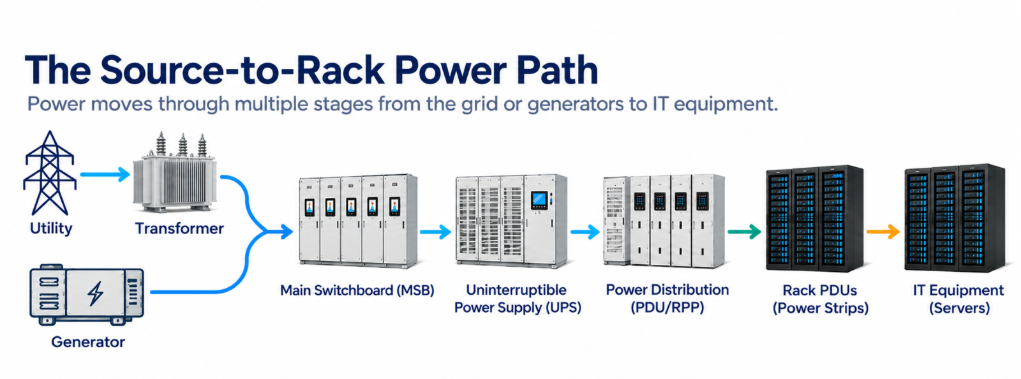
A healthy PDU reading does not mean enough upstream power is available. Operators also need to know which racks depend on each electrical component. They must also know how much capacity remains during maintenance or a failure.
Why Power Architecture Matters
The DOE’s 2024 report estimates that data centers used 4.4% of U.S. electricity in 2023. It also projects that usage could reach 6.7% to 12% by 2028.
Higher-voltage DC systems aim to reduce power losses and conversion steps. Actual savings depend on the equipment, load, and design.
PUE compares total facility power consumption with IT equipment power consumption. It measures how much energy supports the IT equipment. Tracking energy consumption helps operators assess energy efficiency and find opportunities for cost saving. PUE does not measure computing output or prove that more IT capacity is available.
Power and Cooling Must Be Evaluated Together
Nearly all electricity used by IT equipment becomes heat. High-density deployments need enough cooling capacity as well as electrical capacity.
Available power alone does not mean an AI cluster is ready to deploy. Coolant flow, heat removal, and backup cooling must also meet the system's needs.
In liquid-cooled systems, coolant distribution units (CDUs) circulate coolant and transfer heat to another cooling system. Operators must monitor the full cooling path. This includes cold plates, temperature, flow, pumps, and heat removal.
Environmental monitoring also helps teams track temperature humidity and other environmental conditions. Some equipment may still need air cooling.
Conceptual liquid cooling chain, not a piping diagram. Supply and return use separate loops. The arrows do not show flow direction. Many CDUs include a heat exchanger, and some facilities also use chillers.
Uptime Institute’s 2025 cooling research identifies rack density as a key reason for adopting direct liquid cooling. It also highlights the need to integrate cooling with existing infrastructure.
What DCIM Needs to Model
Data center infrastructure management (DCIM) software should connect equipment relationships with operating data. This helps teams:
- Trace power connections, including backup feeds and upstream limits.
- Link cooling performance and available capacity to IT loads.
- Connect BMS, EPMS, and IT data across supported systems.
- Track alarms, real time data, historical demand, and equipment health.
- Find capacity limits caused by power, cooling, or backup requirements.
- These capabilities rely on accurate asset records, mapped connections, and reliable monitoring data.
Spare rack space or available power may still be unusable if another part of the facility limits deployment. A connected DCIM solution helps teams identify potential issues, improve operational efficiency, and support reducing risks during capacity planning.
Connect Monitoring Systems to Equipment Dependencies
A Building Management System (BMS) typically monitors and controls mechanical systems. An Electrical Power Monitoring System (EPMS) tracks electrical conditions. Data center infrastructure management software combines infrastructure monitoring, asset data, and capacity management. These systems can have overlapping functions.
Conceptual integration view. Benefits depend on data quality, supported integrations, equipment connections, and how operators use the information. The dashboard is an example.
When a rack overheats, normal plant and electrical readings may not show the cause. The problem could be a local coolant flow issue or a change in IT demand.
Connecting these readings to the equipment they serve helps engineers find the cause and identify affected loads. This can support reducing downtime and improves efficiency when teams investigate problems.
Evaluate Your Current Platform
- Can your team identify which racks an upstream failure would affect? Can you confirm available power and cooling capacity under required backup conditions? Can you review past demand?
- Can your platform connect existing systems and support new DC power distribution or liquid cooling equipment?
These questions help reveal gaps in visibility. They also help teams compare DCIM tools and choose how to manage data center infrastructure as demand grows.
Modius OpenData connects operational technology and IT infrastructure data. It provides tools for monitoring, asset management, power, cooling, analytics, and system integration.
A shared view helps operators investigate issues and make better capacity decisions. These benefits depend on how well teams configure their systems and equipment connections.
DCIM and Digital Twins
DCIM supports daily infrastructure operations and capacity management. Digital twins create models of physical systems to test and study how they work. They can also use live data. They can also use live data.
The two approaches can work together. Integration depends on compatible systems and data models.
How Does Modius OpenData Support Source-to-Rack Visibility?
Modius® OpenData® connects power, cooling, and IT infrastructure data in a single operational view. It helps data center operators understand equipment dependencies, identify capacity limits, and plan AI deployments with greater confidence.
With Modius OpenData, operators can:
- Monitor power from source to rack and track upstream equipment dependencies.
- Identify unused capacity across power and cooling systems.
- Assess redundancy and risks before adding new AI workloads.
- Connect BMS, EPMS, and IT data for better visibility and faster troubleshooting.
- Plan future deployments using real-time and historical infrastructure data.
By connecting critical systems, Modius OpenData helps operators monitor performance, manage capacity, and make better use of existing infrastructure.
Frequently Asked Questions
1. Why isn't rack-level power monitoring enough for AI data centers?
Rack-level monitoring shows how much power IT equipment uses. It does not show if upstream systems can support more AI workloads. Source-to-rack monitoring helps teams track power connections, find limits, and plan new deployments.
Modius OpenData connects power data and equipment relationships to give teams a clearer view of their systems.
2. How can a data center have available power but no room for more AI workloads?
A data center may have spare power but not enough cooling or backup capacity. Limits in UPS systems, power distribution, or cooling equipment can also block new deployments. Operators must check the full power and cooling path before adding more IT loads.
The Modius OpenData Planning Module helps teams check available power and cooling capacity when planning changes.
3. How does source-to-rack visibility help prevent data center downtime?
Source-to-rack visibility shows which equipment relies on each power source. This helps teams assess failures, plan maintenance, and spot risks before they affect IT systems.
The Modius OpenData Power Module helps teams monitor power systems and assess backup power paths.
4. Why do AI data centers need to monitor power and cooling together?
AI equipment uses a lot of power and produces significant heat. Having enough power does not mean there is enough cooling for new workloads. Teams must monitor both systems to make sure the site can safely support more AI computing.
The Modius OpenData Monitoring Module connects power, cooling, and IT monitoring data to help teams track system health.
5. How does DCIM help data centers find unused capacity?
DCIM software connects equipment data, power use, cooling performance, and available capacity. It helps teams find unused resources and spot limits that could block new deployments. This can help them make better use of their existing systems.
The Modius OpenData Planning Module helps teams assess capacity and plan changes to existing infrastructure.
6. What should operators look for in DCIM software for AI data centers?
Look for DCIM software that connects power, cooling, and IT systems. It should track equipment links, past demand, and available capacity. It should also support liquid cooling and high-density AI systems.
Modius OpenData DCIM helps teams monitor performance, manage capacity, and connect critical systems.